Home › Setup Guides › How to Add EPG on Kodi
Kodi (formerly known as XBMC) is one of the most powerful free, open-source media players available — and one of the most versatile platforms for IPTV streaming. With the right Kodi add-ons and an EPG URL, you can transform Kodi into a full-featured live TV hub complete with a detailed IPTV guide, channel logos, and a 7-day programme schedule.
This guide walks you through exactly how to add IPTV EPG to Kodi using the PVR IPTV Simple Client — the essential Kodi add-on for M3U playlist and XMLTV EPG integration.
What Is Kodi and Why Use It for IPTV?
Kodi is a free, open-source digital media center that supports a vast range of operating systems and devices:
- Windows, Linux, macOS
- Android (smartphones, Android TV boxes)
- Amazon FireStick & Fire TV
- Apple TV
- iOS (via sideloading)
- Xbox, Raspberry Pi, PC
Through its extensive library of Kodi add-ons, it can handle live TV, M3U playlists, IPTV EPG, VOD, recording, and more — all in one free application. The core plugin for IPTV is the PVR IPTV Simple Client, which connects your M3U playlist URL and XMLTV EPG URL directly to Kodi’s Live TV interface.
Step-by-Step: How to Add EPG to Kodi
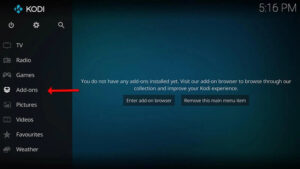
Step 1 – Open Kodi and Go to Add-ons
Launch Kodi on your device and navigate to the main menu. Select “Add-ons”.
Step 2 – Access PVR Clients
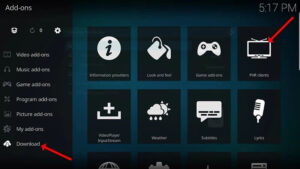
Click “My Add-ons” and then select “PVR clients” from the list. This section contains all installed Kodi add-ons for live TV and IPTV.
Step 3 – Select PVR IPTV Simple Client
Find and select “PVR IPTV Simple Client” from the list. This is the primary Kodi add-on for connecting an M3U playlist and IPTV EPG to Kodi’s Live TV section.
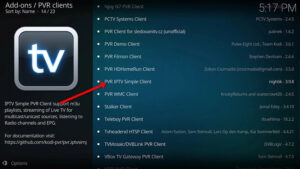
If PVR IPTV Simple Client is not installed, go to Add-ons → Install from Repository → Kodi Add-on Repository → PVR clients → PVR IPTV Simple Client → Install.
Step 4 – Configure the Add-on
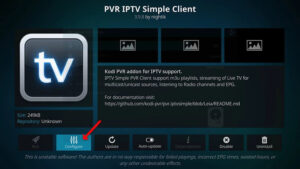
Click “Configure” to open the PVR IPTV Simple Client settings.
5 – Enter Your M3U Playlist URL
Under “General Settings”, enter your M3U playlist URL provided by your IPTV provider. This loads your full channel list into Kodi.
Always use the M3U URL (not a downloaded static M3U file) so your channel list updates automatically when your provider adds or changes channels.
Step 6 – Open EPG Settings
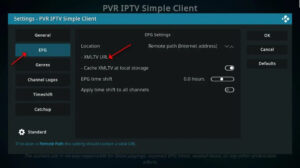
Navigate to the “EPG Settings” tab within the PVR IPTV Simple Client configuration panel.
Step 7 – Set EPG Location
Find the “Location” option and select “Remote Path (Internet address)” to load your IPTV EPG from an online source.
Step 8 – Enter Your EPG URL
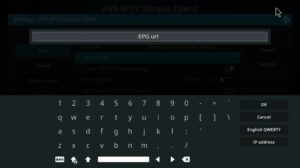
In the “XMLTV URL” field, paste the EPG URL provided by your IPTV provider. This is the XMLTV-format address that carries your programme guide data.
Best EPG for Kodi: The most accurate EPG URL is the one your IPTV provider includes with your subscription — it’s pre-mapped to your exact channel list. For missing channels, free XMLTV sources like
epg.bestcan supplement coverage. These are also good options as a free EPG source for TiviMate EPG sources if you use both apps.
Step 9 – Save Your Settings
Click “OK” to save your M3U playlist URL and EPG URL configuration.
Step 10 – Reboot Kodi
Restart Kodi to apply the changes. Once relaunched, your IPTV channels will appear in the Live TV section and the IPTV EPG programme guide will load alongside them — typically within a few minutes.
Best Kodi Add-ons for IPTV
Beyond PVR IPTV Simple Client, here are other essential Kodi add-ons for IPTV users:
| Add-on | Purpose |
|---|---|
| PVR IPTV Simple Client | Core M3U playlist + XMLTV EPG integration |
| Catchup-TV & More | Catch-up / time-shift support for IPTV streams |
| IPTV Simple PVR | Alternative PVR client for some Kodi versions |
| Exodus Redux / The Crew | VOD streaming add-ons |
| SportsDevil | Live sports streaming |
| YouTube | YouTube integration in Kodi |
Always download Kodi add-ons from the official Kodi repository or well-known trusted sources to avoid security risks.
Advantages of Adding EPG to Kodi
Enhanced Browsing Experience With IPTV EPG active, you can see what’s currently airing and what’s coming up on every channel — making it far easier to find content without having to navigate blindly through channel lists.
XMLTV Compatibility Kodi’s PVR IPTV Simple Client is fully compatible with XMLTV format — the standard used by virtually all IPTV providers for programme guide data. If your provider supplies an EPG URL, it will work with Kodi.
Multiple EPG Sources Kodi supports multiple IPTV EPG sources simultaneously via the PVR client settings — useful when a single provider’s EPG doesn’t cover all channels in your M3U playlist. Add a secondary free EPG source URL to fill in the gaps.
Programme Reminders & Favourites The IPTV guide in Kodi allows you to mark favourite programmes and set reminders, so you never miss a show.
FAQs – Kodi EPG & IPTV Setup
1. What is the best EPG source for Kodi?
The best EPG for Kodi is the EPG URL provided directly by your IPTV provider — it’s accurately mapped to your channel list. For supplementary coverage, free XMLTV aggregators like epg.best are among the best free EPG source options available. These work equally well as TiviMate EPG sources if you use both platforms.
2. Can I use multiple EPG URLs in Kodi?
Yes — Kodi’s PVR IPTV Simple Client supports multiple EPG URL sources. Configure them in the EPG settings to create a comprehensive IPTV guide covering all your channels.
3. Is EPG on Kodi free?
Kodi itself is completely free. The EPG URL is typically included with your IPTV subscription. Some providers may charge extra for EPG access — check with your provider. Free XMLTV sources are also available as a free EPG source if needed.
4. What is PVR IPTV Simple Client?
PVR IPTV Simple Client is the core Kodi add-on for IPTV streaming. It connects your M3U playlist URL and XMLTV EPG URL to Kodi’s built-in Live TV interface, enabling full channel list browsing, IPTV EPG, and guide-based viewing.
5. How do I install Kodi on FireStick?
Enable Apps from Unknown Sources in FireStick Developer Options, install the Downloader app, then use it to download and install the Kodi APK. Once installed, follow this guide to set up PVR IPTV Simple Client and your EPG URL.
6. What is the best M3U playlist for Kodi?
Your IPTV provider supplies your M3U playlist URL with your subscription. For free options, m3u playlist text file iptv org and similar free IPTV M3U sources are searchable online — quality and legality vary. Always use your paid IPTV provider’s URL for the most reliable experience.
7. How do I update Kodi add-ons?
Go to Add-ons → My Add-ons, find any add-on, and select “Check for Updates”. You can also enable automatic updates in Settings → Add-ons → Automatic Updates. Keeping Kodi add-ons updated ensures compatibility with the latest Kodi versions and IPTV features.
8. What is the best EPG for TiviMate from a Kodi perspective?
Both Kodi and TiviMate use XMLTV EPG URLs — the same EPG URL from your IPTV provider works in both apps. The best EPG for TiviMate and Kodi is therefore identical: your provider’s dedicated EPG link, supplemented by a free EPG source URL like epg.best for any missing channels.
9. Does Kodi support M3U playlists with multiple audio tracks?
Yes — Kodi and the PVR IPTV Simple Client support streams with multiple audio tracks. During playback, access the audio track selection via the Kodi OSD (On-Screen Display) menu to switch languages.
10. Is Kodi legal?
Kodi itself is completely legal — it’s free, open-source software. Using it with legitimate IPTV subscriptions and official Kodi add-ons from the official repository is entirely above board. Legality concerns arise only from using unofficial third-party Kodi add-ons that stream pirated content.
Conclusion
Adding IPTV EPG to Kodi via the PVR IPTV Simple Client is one of the most straightforward ways to build a fully featured live TV experience on any device. With your M3U playlist URL and EPG URL configured, Kodi becomes a powerful, free alternative to premium IPTV player apps like TiviMate — especially for users on Windows, Linux, Android TV, and FireStick. Follow the steps above and enjoy a complete, guide-driven IPTV streaming experience.
Ready to start watching?
Try Nartiel8k free for 24 hours, or pick the plan that fits your household.
Start Free TrialSee Plans